After installing Manjaro, a Linux distribution based on Arch, I decided to give Khal a chance. Khal is a terminal based calendar, but it kept complaining about not being able to set my default locale. I couldn’t even write the Swedish characters åäö. There are usually lots and lots of information on the Arch website and after reading that and a bunch of forum posts and trying this and that it still didn’t work.
KDE has a tool to set the locale and it looked correct, but still wrong.
The command locale will show you the locale, obviously 😉

As you can see it’s a mix of en_US.UTF-8 and sv_SE.UTF-8 depending on if it’s language or format. At the first I thought that the problem was LANG since it is set to en_SE.UTF-8 which seems to be a mix of English and Swedish in the same locale. I prefer my system to be in English because it’s much easier to search for solution if the error messages are in English, but I still want to have Swedish formats for numbers, currency, time and so on.
Next I checked what locales was installed:

That looks correct too. Both Swedish and English are installed. But if your language is missing you open the file /etc/locale.gen and remove the # starting the line of your language like this:

As you can see the # is removed from en_US.UTF-8 UTF-8. Next you run the program locale-gen to generate the locale files.
Next I checked the /etc/locale.conf file.
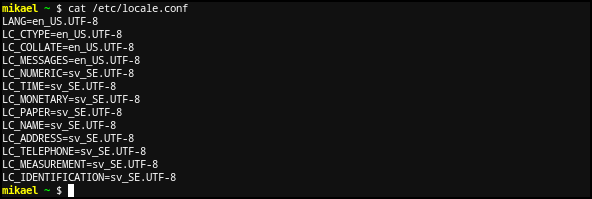
And this is where things got interesting. This file is correct now, but LC_CTYPE, LC_COLLATE and LC_MESSAGES was missing in my file. So I added them to the file and restarted the computer and it worked. I don’t know why those lines where missing since I set them in KDE’s own locale program. Anyway, it works and I can use Khal to manage my calendar. Later I will tell you how I sync that calendar with the calendar on my phone.
Bye.
 Mikael A. Somkane